The setup that stops AI slop before code review
A pull request written with an AI agent adds a new state library, a second utils file and a direct fetch call in a codebase that has an API client for that. Each of those choices would pass review in some other repository, so the reviewer ends up writing the same comments as last week.
The agent writes from what it learned in training, which reflects public code in general, plus whatever the repository gives it. A tech lead controls the second part: which rules the agent reads, which checks fail the build, which jobs run from a saved command and what reviews a diff before a person does.
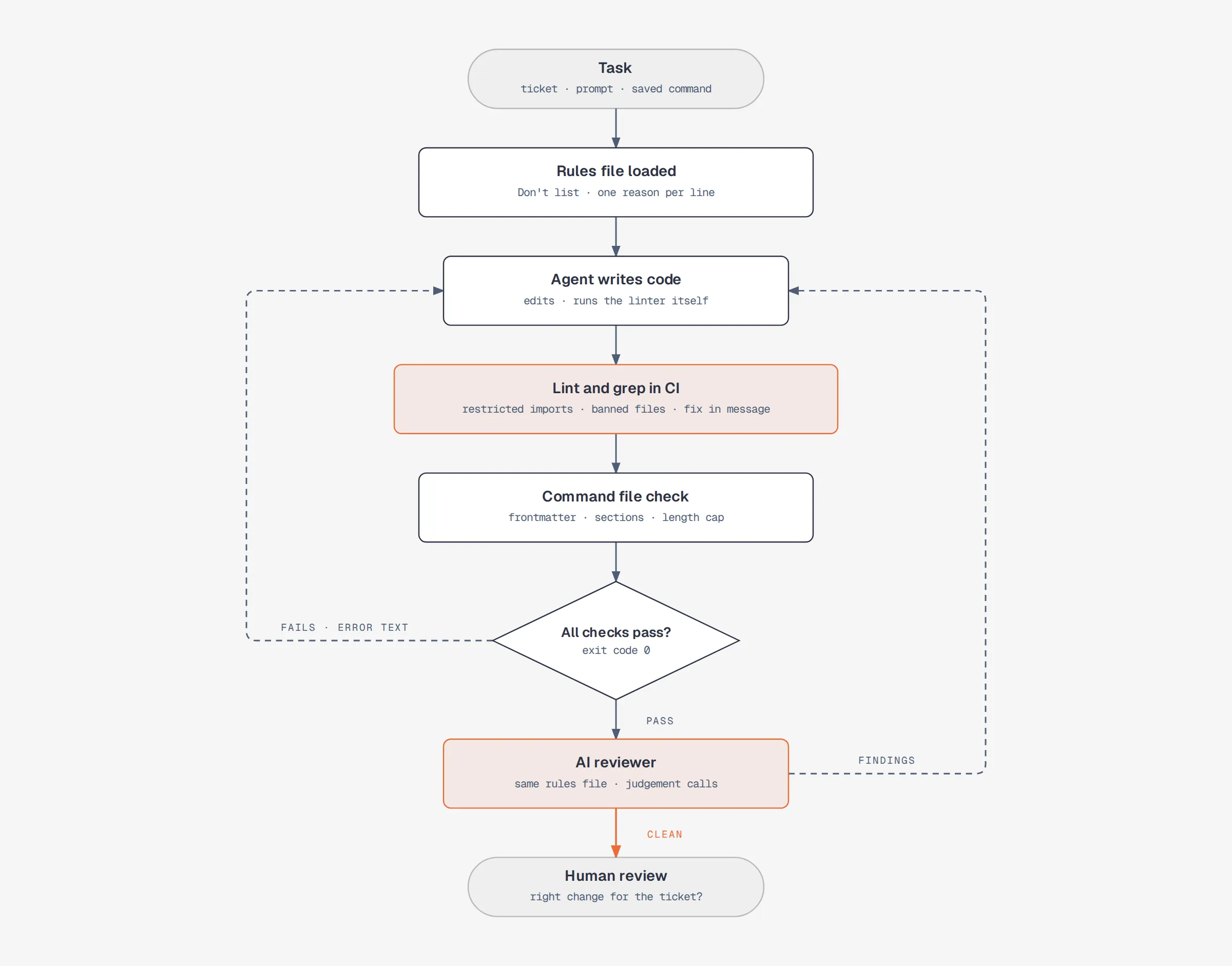
The layers run in a fixed order, with the cheapest and most predictable checks first. The code below is illustrative.
1. A rules file with banned patterns and reasons
Claude Code loads CLAUDE.md from the repository root at the start of every session (other agents read AGENTS.md or a similar file). Its documentation is clear about the limits: “Claude treats them as context, not enforced configuration.” So the file can steer what the agent writes, but nothing in it can fail a build or block a change.
Within that limit, the useful content is a list of things the agent would do by default, each with a reason:
## Don't (example)
- Don't add a state management library. Server state lives in the fetch hooks in src/data/.
- Don't create a new utils file. Put a helper in the module that uses it.
- Don't add a dependency without asking. Each package goes through a security review.
- Don't wrap components in error boundaries. The app has one per route.
A reason gives the agent something to apply to cases the list never named. “Don’t add Redux” covers one library. “Server state lives in the fetch hooks” also covers the next library the agent was about to reach for.
General advice such as “write clean code” or “use meaningful names” describes what the agent already tries to do, so it adds length without adding information, and the same documentation suggests keeping each file under 200 lines, because “longer files consume more context and reduce adherence.”
2. Lint rules for review comments that repeat
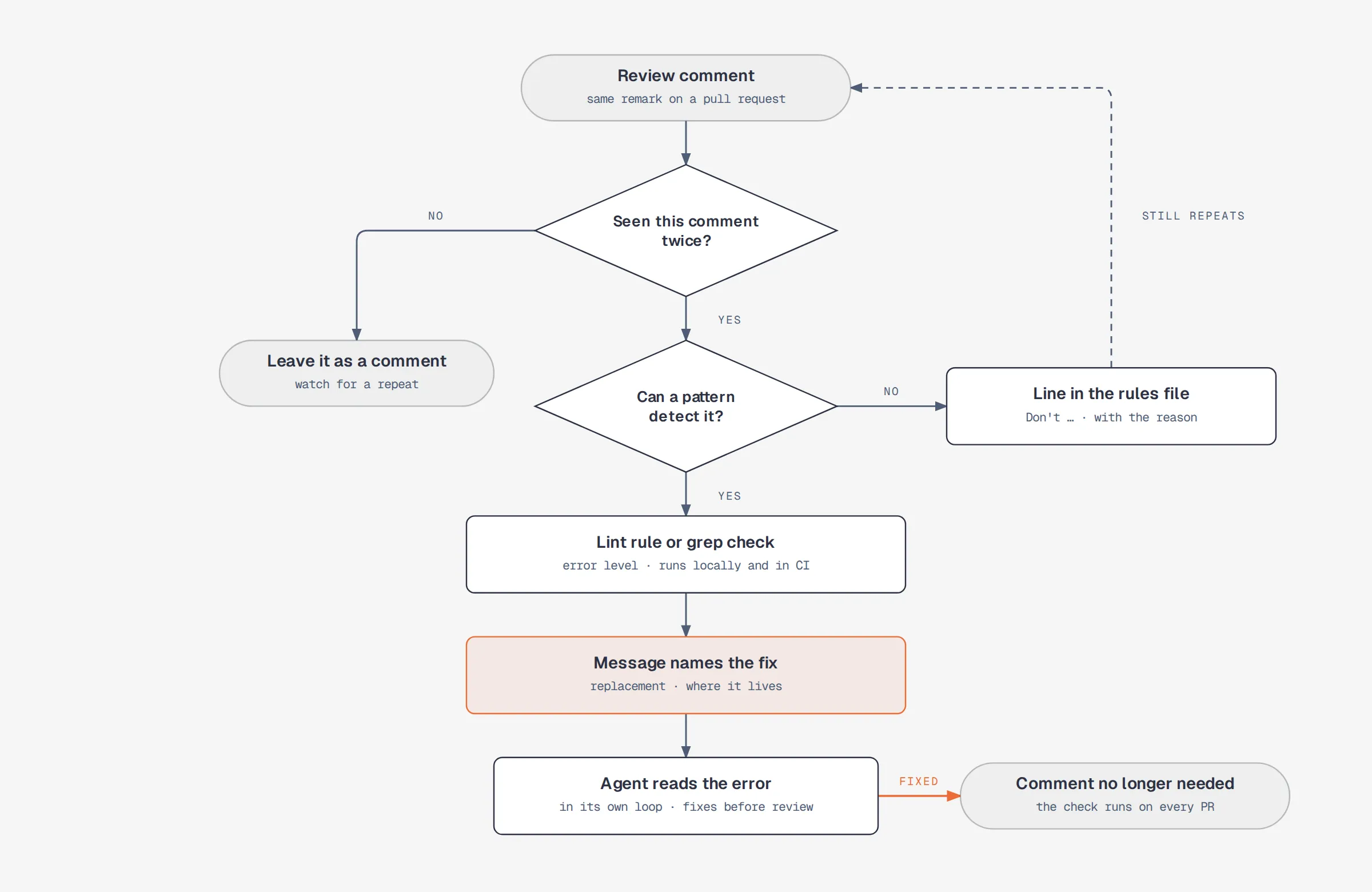
When the same review comment appears on a second pull request, it’s a candidate for a check that fails the build. A lint rule runs as code, so the same input produces the same error every time, while a line in the rules file is interpreted again by the model on each run. The lint error also arrives inside the agent’s own feedback loop: an agent that runs the linter after an edit reads the output as its next input and can fix the problem before a person sees it.
An example that sends every HTTP call through one client module:
// eslint.config.js (example)
export default [
  {
    files: ['src/**/*.{ts,tsx}'],
    ignores: ['src/api/client.ts'],
    rules: {
      'no-restricted-imports': ['error', {
        paths: [{
          name: 'axios',
          message: 'Use apiGet / apiPost from src/api/client.ts. They add auth headers and retries.',
        }],
      }],
      'no-restricted-globals': ['error', {
        name: 'fetch',
        message: 'Use apiGet / apiPost from src/api/client.ts.',
      }],
    },
  },
];
ESLint appends the custom message to the rule’s default error (no-restricted-imports, no-restricted-globals). When the check fails, the agent sees the rule name and this message, and little else about what the team wants instead. If the message names the replacement, the fix is obvious. If it only says the import is restricted, the agent has to pick a workaround, and another HTTP library the rule doesn’t list is a valid pick.
Some patterns sit outside what a linter parses: a stray *.backup.ts file, a banner comment, a TODO with no ticket. A grep step in CI covers those and fails with the same kind of exit code.
3. Saved commands for repeated jobs
Most teams repeat some jobs every week, such as opening a pull request or writing a migration. Typed as a fresh prompt each time, the wording changes from run to run, so the model gets different input and can take different steps. In Claude Code, a Markdown file in .claude/commands/ or a skill becomes a slash command that sends the same text on every run, and its frontmatter can limit the tools it may use with allowed-tools.
A command is still read by a model, so its wording decides how much room is left for interpretation. Two habits shrink that room:
- Checks instead of judgement words. “Stop if the migration is risky” depends on what the model counts as risky on that run. “Stop if the diff contains
DROP COLUMN” is a fixed condition. - Halt rules. Each one names a condition and an exact output line, so a missing input ends in a visible stop.
---
description: Open a pull request for the current branch (example)
allowed-tools: Bash(git:*), Bash(npm run lint), Bash(gh pr create:*)
---
## Inputs
$ARGUMENTS: the ticket id. Empty → halt USAGE.

## Steps
1. Run `git diff --stat main...HEAD`. No output → halt NO_CHANGES.
2. Run `npm run lint`. Any error → halt LINT_FAILED.
3. Open the PR with `gh pr create`, title `<ticket id>: <summary>`.

## Halt rules
- USAGE: /open-pr <ticket id>
- NO_CHANGES: the branch has no commits ahead of main.
- LINT_FAILED: <first lint error>
- MISSING_FACT: <name>. A step needs a fact no command output contains. Do not infer it.

## Self-check
- The PR title starts with the ticket id.
Anthropic’s own commit.md is a short public example of the format.
4. A check on the command files
Over time, edits to a command file add steps, drop halt rules and stretch a short file into pages of prose. A small CI script can hold every command file to one shape:
#!/usr/bin/env bash
# check-commands.sh (example): pass it every path a PR changed
fail=0
for f in "$@"; do
  [[ $f == .claude/commands/*.md ]] || continue
  for key in description allowed-tools; do
    grep -q "^$key:" "$f" || { echo "$f: missing frontmatter $key"; fail=1; }
  done
  for s in '## Inputs' '## Steps' '## Halt rules' '## Self-check'; do
    grep -qF "$s" "$f" || { echo "$f: missing section $s"; fail=1; }
  done
  # The flag skips the length cap only. The checks above still run.
  if ! grep -q '^skip-length-check: true' "$f" && [ "$(wc -l < "$f")" -gt 150 ]; then
    echo "$f: over 150 lines"; fail=1
  fi
done
exit $fail
The script ignores paths outside .claude/commands/, so CI can hand it the full list of changed files.
Some files have a real reason to run long, such as one that holds a reference table, which is what the skip flag is for. A flag that lifts the length cap and nothing else keeps the frontmatter and section checks running on that file. A flag that exempts the whole file from the script removes it from checking for good, and every later edit to it goes unchecked.
5. An AI reviewer after lint and before the human
A model review is slower and more expensive than lint, and its output varies between runs, so it goes last among the automated checks. Placed after lint and grep, it rarely sees a diff that still has a problem a pattern could catch. What’s left for it is what a pattern can’t describe: a helper written for one call site, a refactor of code the ticket never mentioned, a new file where an existing module would fit.
The reviewer should load the same rules file the coding agent loaded, so a Don’t line that the coding agent ignored gets checked again at review time.
The human review comes after every mechanical check has passed. That leaves the reviewer with questions about the change itself, such as whether it solves the ticket and whether it belongs in this part of the codebase.
Order of adoption
The first two layers need no new tooling. A Don’t section goes into a file the agent already loads, and a restricted-import rule goes into a lint config the project already runs. Commands and the check on them start to matter once a team has jobs it repeats every week.